Your folder structure is your CLI.
Files become commands. Folders become subcommand groups. Structs become type-checked flags. Help text, completions, "did you mean?", prompts, progress bars, and docs — wired up at compile time for zero-cost dispatch.
$ myapp deploy api --env staging
Deploying api to staging

$ myapp dploy api
Error: unknown command 'dploy'
  Did you mean deploy? (run with --help)

$ myapp users create --help
USAGE  myapp users create <name> [options]
  -a, --admin     Grant admin role
      --role     owner · admin · member
✔ generated from your command metadata
No routing table. No registration calls.
Hover a file to see the command it becomes. Dispatch is generated Zig code — there's no runtime filesystem scan, no reflection, nothing to register by hand.
$ myapp deploy api --env staging
Deploying api to staging
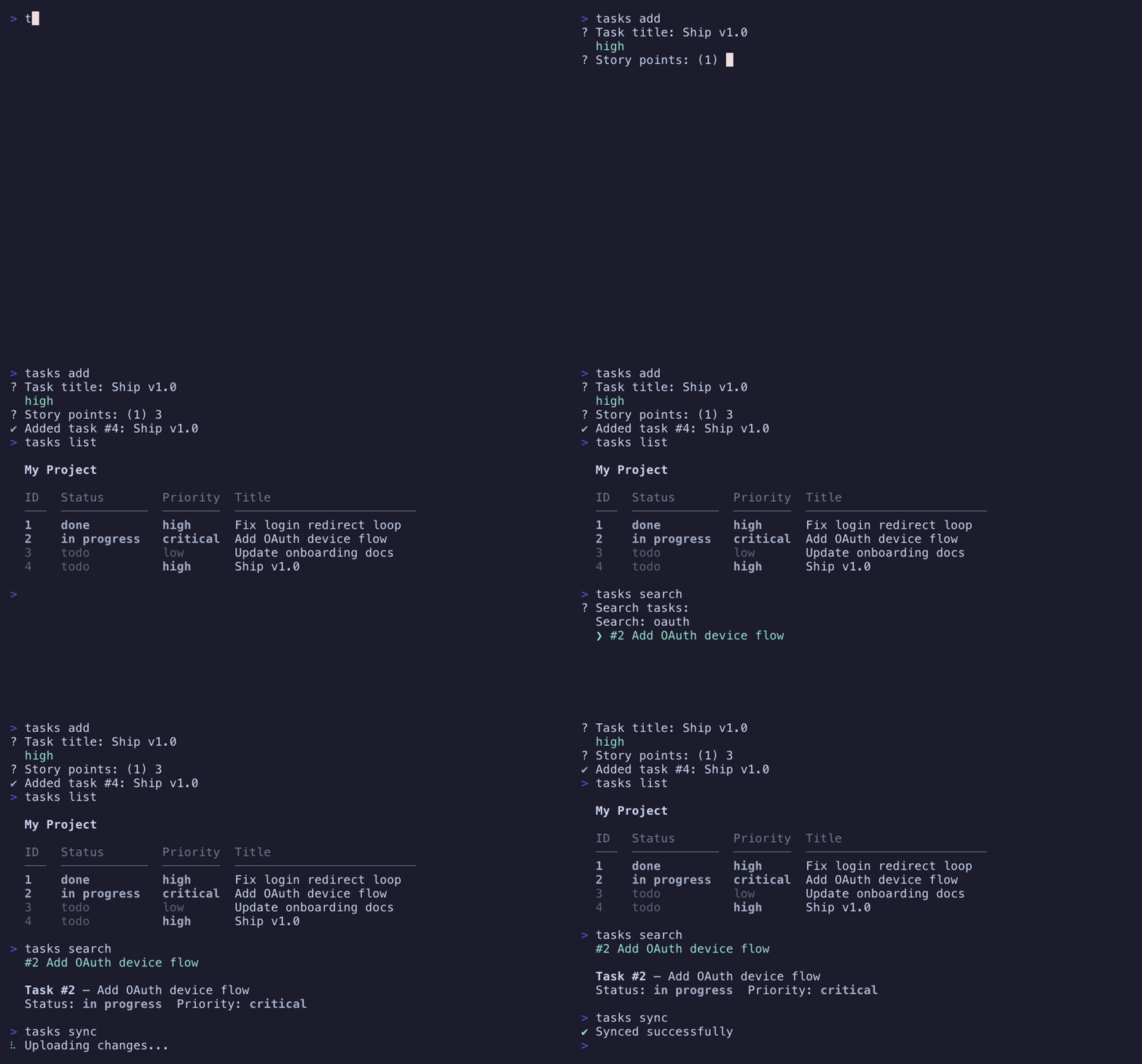
A real recording, not a mockup.
Every file in the showcase task tracker on the left is a command — the recording on the right is that exact CLI running, with interactive prompts, a colored table, live search, and a spinner, captured from a real terminal with VHS. The highlighted files are the ones you see run.
src/commands/
├── add.zig
├── config.zig
├── done.zig
├── edit.zig
├── import.zig
├── init.zig
├── list.zig
├── remove.zig
├── search.zig
├── show.zig
├── sync.zig
└── sprint/
    ├── index.zig
    ├── close.zig
    ├── create.zig
    └── list.zig
Wrong types never compile.
Args and Options are plain Zig structs. Typo a field or reach for one that doesn't exist, and the build fails — naming the exact command file, not a runtime stack trace.
pub const Options = struct {
    env: []const u8 = "production",
};

pub fn execute(args: Args, options: Options, context: *Context) !void {
    try context.stdout().print(
        "target: {s}\n", .{ options.envv });
}
commands/deploy.zig:6:52: error: no field named 'envv' in struct 'commands.deploy.Options'
    try context.stdout().print("target: {s}\n", .{options.envv});
                                                           ^~~~
commands/deploy.zig:2:16: note: struct declared here
note: did you mean 'env'?
Everything a polished CLI needs, none of the wiring.
The boring-but-essential parts of a command-line tool, generated for you and type-checked at compile time.
File-based commands
Create files in commands/
to add commands; nest folders for subcommands. The path becomes the command.
Type-safe parsing
Define args & options as Zig structs. Parsing is checked via comptime introspection — wrong types never compile.
→ docsDid-you-mean
Auto-generated --help, --version, shell completions, and typo suggestions out of the box.
Interactive prompts
Text, confirm, select, multi-select, password, number, and editor — with optionally searchable select and multi-select, all falling back gracefully without a TTY.
→ docsProgress & spinners
Nine spinner styles plus progress bars with ETA. Semantic colors adapt to your terminal's capabilities.
→ docsCLI/TUI hybrid
A terminal-native layout engine: stream into scrollback with a diffed live region, or go full-screen with forms, overlays, and mouse input.
→ uiTheming
Declare one theme; help, prompts, progress, and full-screen chrome all follow it — true color down to NO_COLOR, no branches in your code.
→ themingDocs generation
Emit markdown, man pages, and HTML straight from command metadata. Config loads transparently from JSON, TOML, or YAML.
→ docsThree tools, three different jobs.
zig-clap
An argument parser, and the lightest of the three. If flag parsing is all you need, it's a great choice.
zli
A batteries-included framework built around a runtime builder — commands assembled with Command.init()
as the program starts.
zcli
The directory tree is the command tree, discovered at build time. Batteries extend past parsing into the whole terminal experience.
Dogfooded, not just demoed.
zcli — the meta-CLI
init, add, mv, rm, tree, dev, guide, and release
are files in its own commands/
directory, running on the framework's own plugins.
tasks — showcase app
A fully functional task tracker: 14 commands, nested groups, every prompt type, themed output, config files, and doc generation.
Stop wiring up arg parsers.
Add zcli to build.zig.zon, drop a file in commands/, and run zig build. That's the whole onboarding.